Draw Climber



What Is Draw Climber?
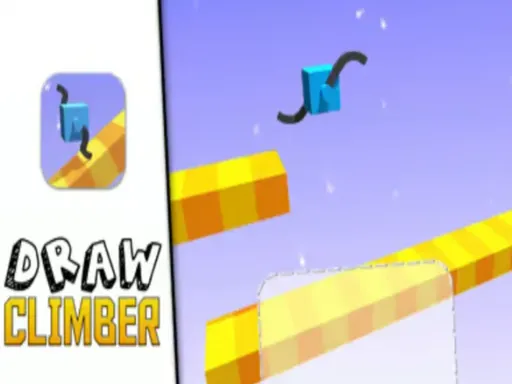
Draw Climber is a fast, physics-based racing game where you don’t press jump or drive – you draw legs for a cube-shaped character and let your drawing do the work. Instead of fixed animations, the movement is created by the legs you sketch on the screen. Those legs spin, stretch, and bump your little block across platforms, ramps, stairs, and moving obstacles.
In Draw Climber, every level is a short race from start to finish. There’s usually a rival character or a timer pushing you to move as quickly as possible. The trick is that the terrain is always changing:
- Flat tracks that reward smooth, rolling shapes
- Steep steps and walls that need longer, claw-like legs
- Deep gaps and pits that demand wide, looping designs
Because the game uses simple but lively physics, your climber sometimes tumbles or flips in funny ways. That mix of simple controls, creative drawing, and chaotic movement is what makes Draw Climber stand out among hyper-casual puzzle racers.
Why Draw Climber Feels So Addictive
Draw Climber is easy to understand in a few seconds, yet it keeps you experimenting. One tiny change in your drawing can completely change the way your climber moves. A circle might turn your cube into a rolling wheel. A sharp zigzag might help it claw up vertical steps. A long line might bridge a gap… or cause you to trip over the next wall.
Because levels are short and you can redraw at any time, you keep thinking, “Let me try one more shape – I can do better.” That “just one more run” feeling is a big reason people keep coming back to Draw Climber.
Playing Draw Climber in Your Browser
No Download, Just Click and Play
You don’t need to install anything to enjoy Draw Climber. The game runs in modern browsers using HTML5 technology, which means you can play on desktop, laptop, or mobile browser as long as you have an internet connection.
To keep things simple and safe, you can play Draw Climber directly in your browser at http://onelinedraw.io/. Open the site, find the Draw Climber game, and you’re ready to race in just a few seconds – no extra launchers, no app stores, no downloads.
Why Play Draw Climber on onelinedraw.io?
When you load Draw Climber on onelinedraw.io, you get:
- Instant access in your browser
- A clean layout that keeps the focus on gameplay
- Easy replay and quick restarts for nonstop experimentation
If you like to play during breaks, at school, or while traveling, Draw Climber on onelinedraw.io is perfect: open the page, draw your legs, and start climbing.
How to Control Draw Climber
Core Controls
The controls for Draw Climber are very simple:
-
Mouse (PC / laptop)
- Left-click and drag inside the drawing area to sketch the legs.
- Release to confirm your shape and watch your climber move.
-
Touchscreen (mobile / tablet browser)
- Tap and drag with your finger to draw the legs.
- Lift your finger to test your design.
Your drawing appears on both sides of the cube as “legs.” These legs rotate like paddles, pushing the character forward, upward, or sometimes sideways depending on your design.
Redrawing on the Fly
You are not stuck with one design. One of the best features of Draw Climber is that you can redraw your legs at almost any moment during the race. When you notice:
- Your climber cannot climb a new staircase
- It keeps getting stuck in a narrow tunnel
- It is moving too slowly on flat ground
…you simply erase or overwrite the old shape and sketch a new one. The climber instantly updates and tries to move with the new legs. Think of every level as a tiny lab where you test different shapes until you find something that works.
Simple Tips for Better Control
Even though Draw Climber looks simple, a few small habits can help:
- Short, thick legs are often more stable on bumpy terrain.
- Long legs can cross gaps and climb high walls, but they might make you flip.
- Curved shapes can roll smoothly, which is great for speed on flat tracks.
- Do not be afraid to redraw many times in one level – the game expects you to adapt.
Where Draw Climber Comes From
Developer and Game Style
Draw Climber was created by Voodoo, a well-known studio that specializes in hyper-casual mobile and browser games. Their titles usually have easy one-touch controls, short levels, and mechanics that are simple to learn but fun to master. Draw Climber follows this style perfectly: you draw, the physics engine does the rest, and the challenge comes from reacting quickly to new obstacles.
Over time, Draw Climber has appeared on different platforms, including mobile apps and HTML5 browser versions. That means players can now enjoy Draw Climber directly in the browser on sites like onelinedraw.io without needing a phone or tablet.
Frequently Asked Questions About Draw Climber
Is Draw Climber free to play?
Yes. Draw Climber is designed as a free-to-play hyper-casual game. When you play Draw Climber in your browser at onelinedraw.io, you can jump into levels without paying anything.
Can I play Draw Climber in a browser without downloading?
Absolutely. The HTML5 version of Draw Climber runs directly in modern browsers like Chrome, Edge, or Firefox. Just visit http://onelinedraw.io/, open the Draw Climber page, and start drawing legs. No installation or plugin is required.
What’s the goal in Draw Climber?
In most levels, your main goal is to reach the finish line as fast as possible. Sometimes you’re racing another character; sometimes you are just beating the clock or trying to collect more coins and rewards. To win, you need to draw legs that handle each section of the course: slopes, stairs, pits, and moving platforms.
Do the shapes I draw really matter?
Yes, they matter a lot. Different leg designs change how your cube moves:
- Wide designs can help with balance and crossing big gaps.
- Tall designs can step over blocks or climb ledges.
- Very strange designs might make your cube spin or flop in place.
Draw Climber rewards you for experimenting. Even small changes – like making a line slightly longer or more curved – can turn a failing run into a victory.
How do I go faster in Draw Climber?
To move faster in Draw Climber, think about efficiency and contact:
- On flat ground, try smooth, rolling shapes that keep your cube in motion instead of bouncing.
- On stairs or tall walls, use long legs that can pull or push your cube upward without getting stuck.
- Don’t forget to redraw mid-race when the terrain changes – one design rarely works for a whole level.
Is Draw Climber good for kids and casual players?
Yes. Draw Climber uses simple shapes, bright colors, and easy controls, which makes it friendly for younger players as well as adults who just want a quick, light game. There is no complex story to follow, so anyone can pick it up, draw a few lines, and start climbing in seconds.
Where is the best place to try Draw Climber online?
If you want a fast, safe, and straightforward way to play Draw Climber in your browser, head to http://onelinedraw.io/. Open the site, launch Draw Climber, and start sketching legs to conquer every obstacle. Whether you have a few minutes between tasks or you want to experiment with wild designs for an hour, Draw Climber on onelinedraw.io gives you an easy way to enjoy this creative physics racer anytime.

Comments
Loading comments…